

Overview
The Manage Basic UDIs section in UDI Hub displays all imported and validated Basic UDI‑DIs and provides a central overview of their current lifecycle, submission, and registration states.It serves as the main entry point to monitor the regulatory progress of each product group and its assigned devices. Each Basic UDI‑DI is represented as a card, showing key identifiers and status information at a glance.
Users can easily review the complete group status, navigate to assigned devices, and open detailed views when needed.
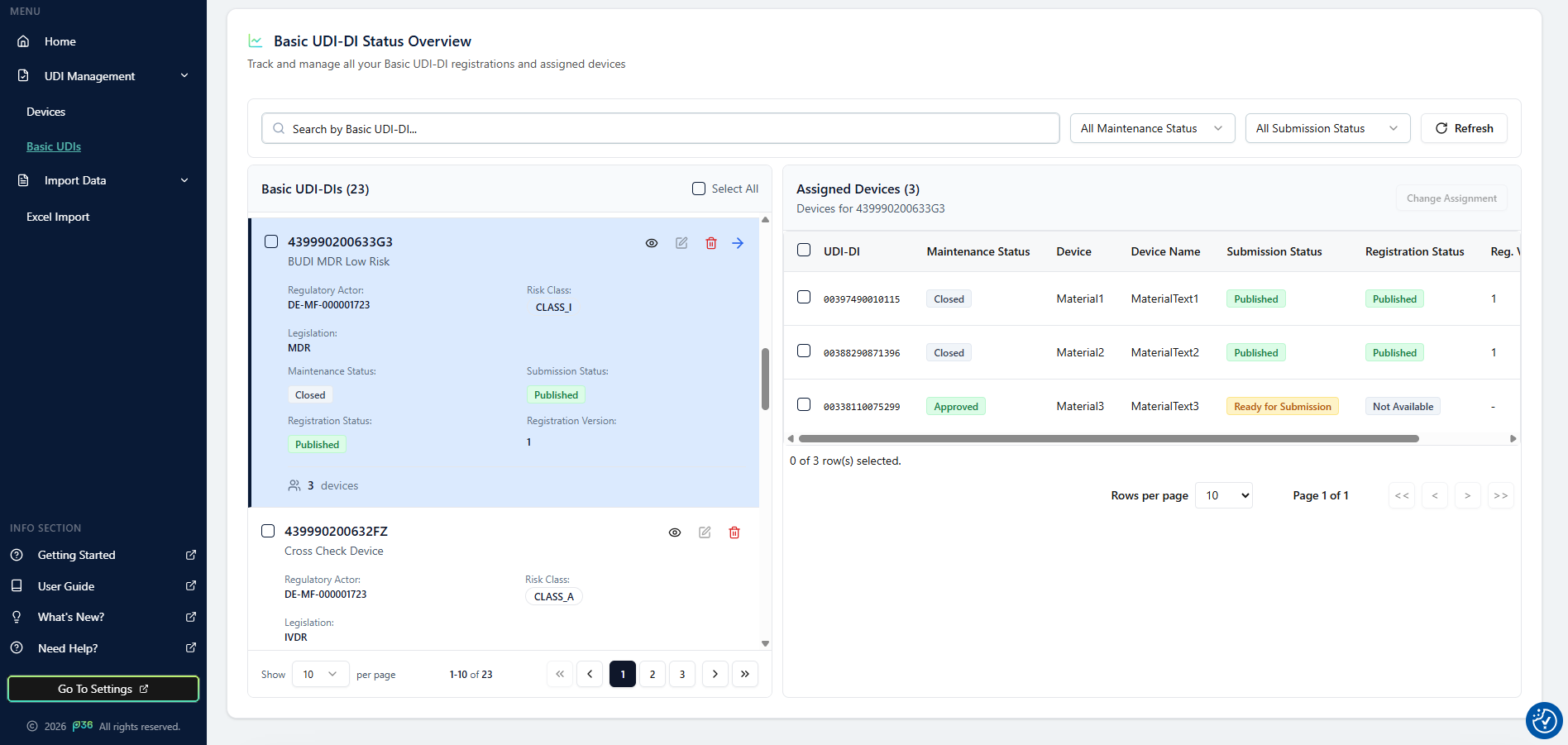
Basic UDI-DI View
After successful import, each Basic UDI‑DI is listed on the page with the following key attributes:- Basic UDI‑DI code
- Regulatory Actor (e.g., Legal Manufacturer SRN)
- Legislation (MDR, IVDR, or SPP)
- Risk Class
- Maintenance Status
- Submission Status
- Registration Status
- Registration Version
This provides a clear and centralized overview per product group, supporting traceability and monitoring across the entire portfolio.
Status Information
Each Basic UDI‑DI and its assigned devices include several key status indicators that describe their current state in the UDI process.Maintenance Status
The Maintenance Status reflects the data lifecycle state within UDI Hub.- Draft – Will be implemented later for in app edit functionalities.
- Approved – The data is validated and ready for submission.
(Set automatically by the system after successful import.)
Submission Status
The Submission Status indicates the current submission stage:- Ready for Submission – The Basic UDI‑DI can be submitted to the authority.
- In Progress – Submission has been triggered.
- Error – A submission error occurred; details are available in the submission tab.
- Published – Submission has been successfully processed and is accepted by authority.
Registration Status
The Registration Status shows the outcome of submissions with the authority:- Not Available – No registration yet.
- Published – Successfully registered and published in the authority database the first time.
- Updated – An existing registration was successfully updated.
Registration Version
Indicates how many times the Basic UDI‑DI has been successfully registered or updated with the authority.It serves as an audit reference for tracking revisions and resubmissions over time.
Detailed View
To review details for a specific Basic UDI‑DI, click the eye icon on its card. This opens the Basic UDI‑DI Details window, which contains three tabs:-
Basic UDI‑DI Data
Displays all attributes that were imported into the system. -
Submission Status
Shows submission details, including trigger date, current status, and — if applicable — error messages returned by the authority or success message. -
Change Log
Lists all tracked changes and versioned updates for this Basic UDI‑DI, including timestamps, responsible users, and previous values.
Delete Entries
You can delete a Basic UDI‑DI only if:- It has not been successfully submitted to an authority, and
- No devices are currently assigned to it.
Deleting allowed records helps maintain data accuracy and removes entries that were created in error, without compromising audit integrity.
Tip
Use the Basic UDI-DI overview to review the status of an entire product group.
This structure gives you clear visibility of the overall maintenance and registration statuses, allowing quicker identification of inconsistencies and better control over your submission readiness.
This structure gives you clear visibility of the overall maintenance and registration statuses, allowing quicker identification of inconsistencies and better control over your submission readiness.